Scoring & Rubrics
Aimee.ai uses AI-powered scoring to evaluate learner performance against grading criteria you define on each roleplay. This page explains how criteria work and how scores are generated.
Rubric management: Trainers, Workspace Owners, Admins Score review: Reviewers, Workspace Owners, Admins
How scoring works
graph LR
    A[Learner completes session] --> B[Transcript captured]
    B --> C[AI scores each roleplay against its criteria]
    C --> D[Score report generated]
D --> E[Reviewer validates]- When a learner finishes a session, the conversation transcript is saved
- The AI scoring engine evaluates each roleplay against that roleplay's own criteria
- A score report is generated with per-roleplay, per-criterion scores; when a course has several roleplays, the session score is the average of the roleplay scores
- A reviewer can inspect and optionally override the scores
Grading criteria
Grading criteria belong to a roleplay - each roleplay in a course carries its own set, so two roleplays with different goals are marked against different criteria. Each criterion defines one aspect of performance to evaluate.
Adding criteria to a roleplay
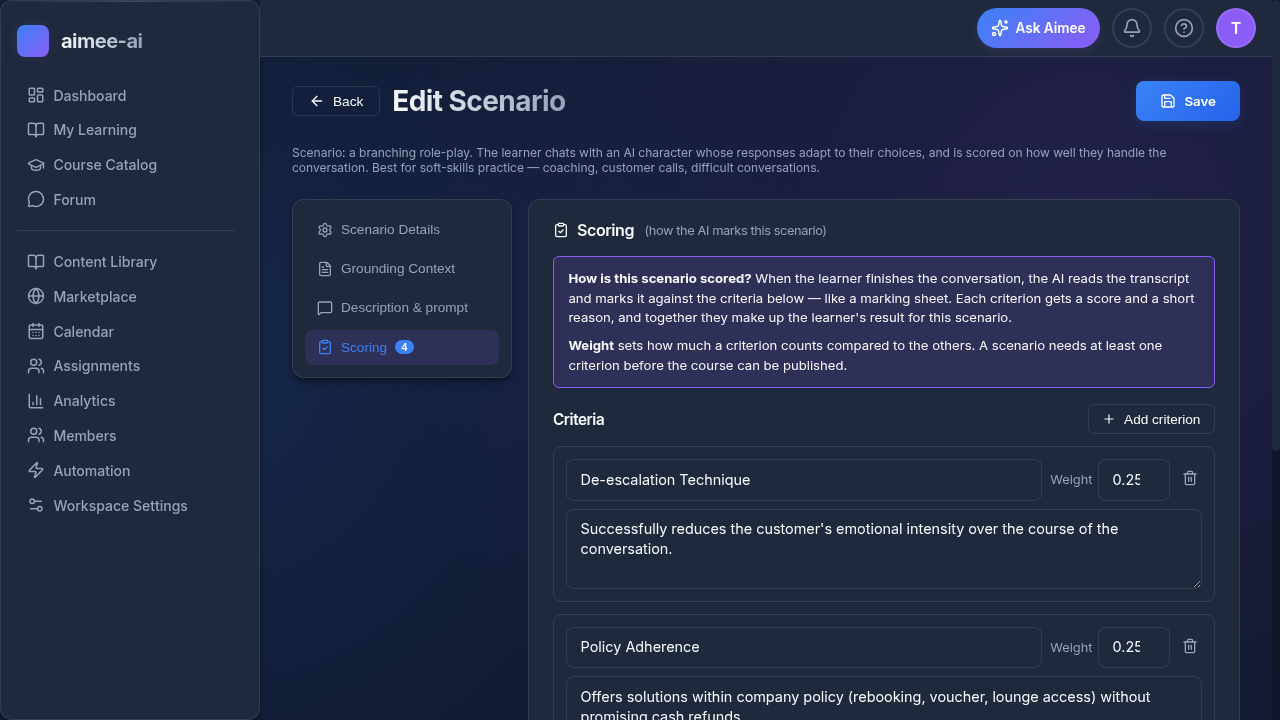
- Open the roleplay in the Roleplay Editor (from the course's Content tab)
- Switch to the Scoring tab
- Click Add criterion
- Fill in the criterion details:
| Field | Description |
|---|---|
| Title | Name of the criterion (e.g., "Empathy") |
| Description | What this criterion measures |
| Weight | Relative importance (default: 1.0) |
| Guidance | Instructions for the AI scorer on how to evaluate this criterion |
Example rubric
A customer escalation course might use:
| Criterion | Weight | Description |
|---|---|---|
| Empathy | 1.5 | Did the learner acknowledge the customer's feelings? |
| De-escalation | 2.0 | Did the learner successfully calm the situation? |
| Policy Adherence | 1.0 | Did the learner follow company policy? |
| Resolution | 1.5 | Did the learner propose an appropriate resolution? |
Weight strategy
Higher weights make a criterion count more toward the roleplay's score. In the example above, "De-escalation" has the highest weight (2.0) because it's the most important skill for an escalation roleplay.
Every roleplay needs at least one criterion
A course cannot be published while any of its roleplays has no grading criteria - the publish check lists the offending roleplays with a Take me there link to each one's Scoring tab.
Score reports
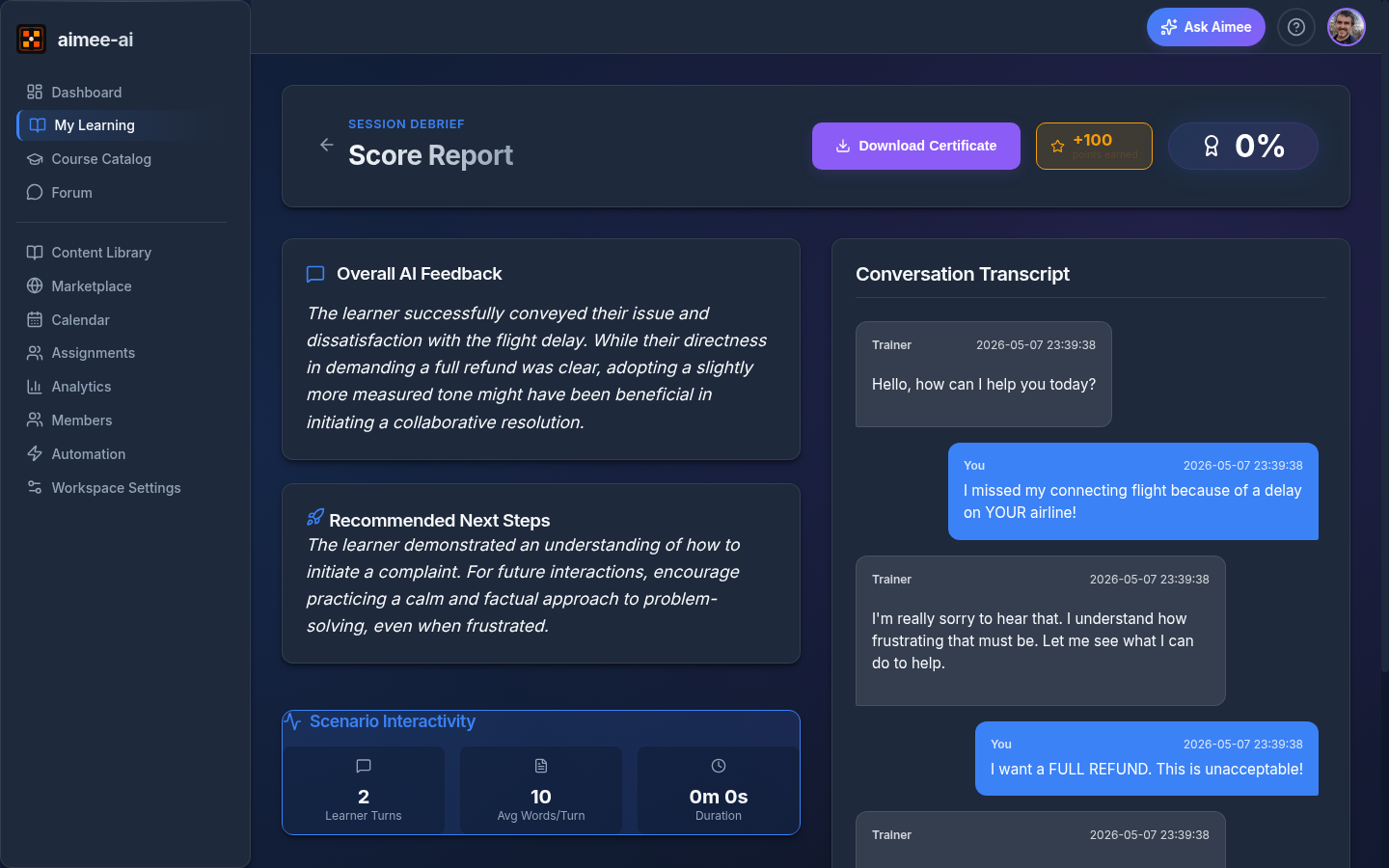
A score report contains:
| Field | Description |
|---|---|
| Overall Score | Average of the roleplay scores (0-100); each roleplay's score is the weighted average of its criteria |
| Breakdown | Individual score per criterion, grouped by roleplay |
| Feedback | AI-generated qualitative analysis |
| Recommendations | Suggested improvements for the learner |
| Status | pending, processing, completed, error |
Score calculation
Each roleplay's score is a weighted average of its criteria:
Roleplay = Σ (criterion_score × weight) / Σ (max_possible × weight) × 100
The session's overall score is the plain average of the roleplay scores. A session on a course with no grading criteria (older published versions) shows Ungraded (-) instead of a percentage - it still counts as completed and is left out of score averages.
Pass/fail
The trainer sets a pass threshold per course (default: 70%). If the overall score meets or exceeds the threshold, the learner passes.
Reviewing and overriding scores
Reviewers can:
- View the full score breakdown for any completed session on its Debrief page.
- Replace the AI's output via three free-text fields on the Debrief:
- Overall Score Override - a new aggregate score.
- Feedback Override - replacement qualitative feedback for the learner.
- Next Step Recommendation - a new recommended next step.
- Click Save Reviewer Override to record the changes.
The reviewer can edit any combination of the three fields; the per-criterion breakdown produced by the AI is not directly editable.
Override audit trail
The original AI score and feedback are kept alongside the override so the full history is auditable. Always edit the Feedback Override with a clear explanation of why you changed the AI's evaluation.
Related
- Courses - creating courses and roleplays
- Assignments - assigning courses
- Reviewer role guide - review workflow