Course Catalog
The Course Catalog lets workspace members browse available published courses and self-enrol without needing a trainer to assign them.
Accessible to: every workspace member (Workspace Owner, Admin, Trainer, Reviewer, Learner)
Accessing the catalog
Click Course Catalog in the sidebar.
Browsing courses
The catalog has two views you can switch between with the toolbar at the top of the page:
- Courses - individual published courses you can filter by tag.
- Learning Paths - curated sequences of courses you can enrol in as a single programme.
Use the search bar in the toolbar to look across whichever view you're in.
Courses view
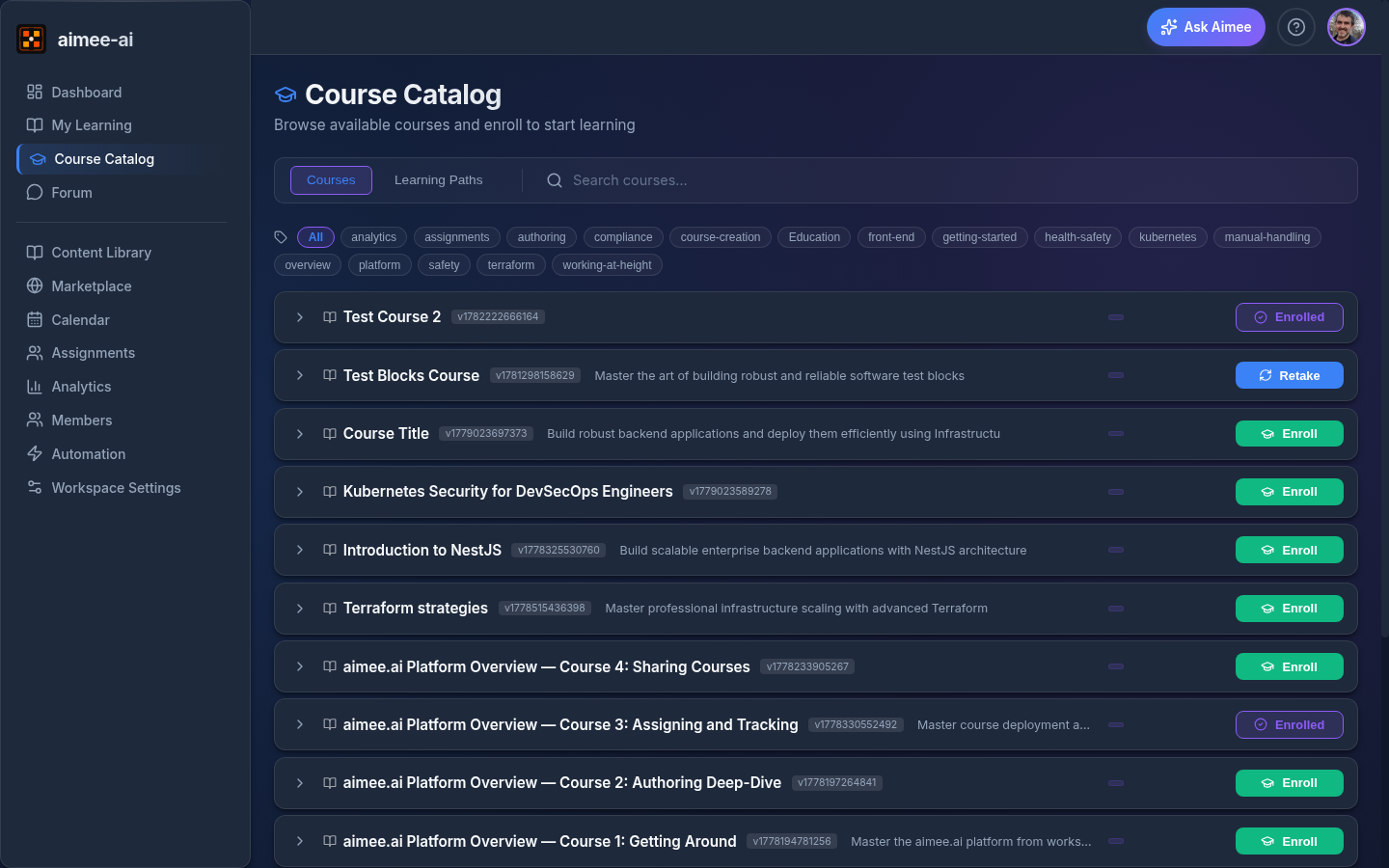
The landing screen is a single list of every available course, with a row of tag filter chips along the top. Each course appears once, no matter how many tags it carries.
To narrow the list, click one or more tag chips:
- With no chips selected (or All), you see every course.
- Selecting several tags narrows the list to courses that carry all of the selected tags. For example, picking Cloud and Security shows only courses tagged with both.
- Click an active chip again to remove it, or click All to clear every filter.
If the combination of tags you've picked matches no courses, the page shows a No courses match all selected tags message with a Clear filters button.
When you start typing in the search bar, the tag chips are hidden and the list shows matching courses across the whole catalog.
Each course row shows:
- Course title and a short description.
- Version label (e.g., v1.0).
- An action button whose state depends on whether you're already enrolled (see Enrolment status below).
Click a row to expand it for more detail about the course, including its section-by-section breakdown. Click any section to reveal the individual lessons it contains, so you can preview the full course structure before enrolling.
Learning Paths view
Switch to Learning Paths to see the multi-course programmes published in your workspace. Each path lists the courses it contains and shows a single Enrol button. Enrolling assigns the path to you and creates assignments for each of its courses in order. Already-enrolled paths show as Enrolled (read-only); paths you've finished show as Retake.
Enrolment status
Each course row shows one of three button states:
| Status | Button | Action |
|---|---|---|
| Not enrolled | Enroll | Click to self-enrol. Creates an assignment for you. |
| Already enrolled | Enrolled (read-only) | You have an active assignment. Go to My Learning to access it. |
| Completed | Retake | Click to create a new assignment and retake the course. |
Enrolling in a course
- Find a course you'd like to take.
- Click Enroll.
- A success message appears with a link to My Learning.
- Open My Learning to launch your new assignment.
Duplicate enrolment
You cannot enrol in a course you already have an active (non-completed) assignment for. The button will show Enrolled.
Retaking a course
If you've completed a course and want to retake it:
- Find the course in the catalog (it will show Retake).
- Click Retake.
- A fresh assignment is created.
- Open My Learning to launch it.
Previous results preserved
Retaking a course creates a new assignment. Your previous completion results and debrief remain available in the Completed & Debriefs tab.
Related
- Learning Paths - enrolling in a multi-course programme
- Learner Portal - accessing your assignments
- Courses - course creation and management (Trainers/Admins)
- Learner role guide - complete learner workflow